
AI Fashion Photo Editing: Magazine-Ready Looks in Minutes
The Fashion Photography Revolution: How AI is Changing Everything
Magazine-quality fashion photos used to require expensive equipment, professional lighting setups, and hours of post-production work. Today, AI photo editing apps have democratized this process entirely. Whether you're an influencer perfecting your outfit posts, a small fashion brand creating product images, or just someone who wants their photos to look runway-ready, AI tools can get you there in minutes—not hours.
The fashion photography industry has been transformed by artificial intelligence. According to recent discussions on Reddit's photography communities, creators are increasingly turning to AI-powered solutions that deliver "studio-quality visuals with full creative control" without the traditional photoshoot costs. Let's explore how you can achieve magazine-ready fashion looks using the best AI photo editing tools available today.
Why Fashion Photography Needs AI
Traditional fashion photo editing involves multiple specialized skills: color correction, skin retouching, background manipulation, and precise object removal. Each of these typically requires years of practice in software like Photoshop. AI has compressed this learning curve dramatically.
Consider the common challenges fashion photographers face:
- Removing unwanted elements — distracting backgrounds, photo-bombers, or unflattering objects
- Achieving consistent lighting — making smartphone photos look professionally lit
- Perfecting compositions — adjusting layouts without losing image quality
- Batch processing — editing multiple outfit photos with consistent style
AI solves each of these problems with remarkable efficiency. Instead of manually selecting pixels and cloning textures, you simply highlight what you want removed, and the AI fills in the background seamlessly.
Key AI Features for Fashion Photo Editing
1. Intelligent Object Removal
The most valuable feature for fashion photography is seamless object removal. Picture this: you've captured the perfect outfit shot, but there's a trash can in the background or a passerby walked into frame. Traditional editing would require painstaking work with clone stamps and healing brushes.
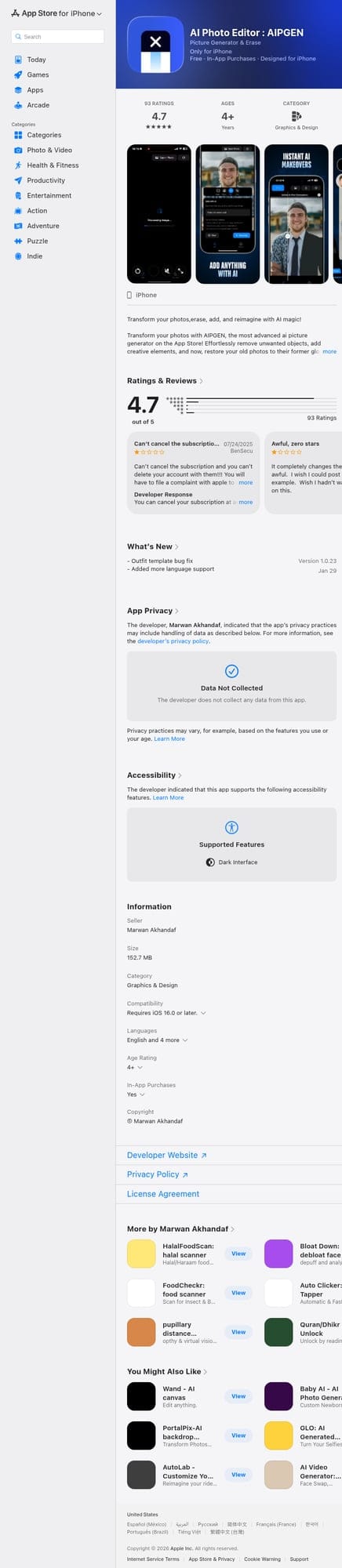
AI-powered removal works differently. Apps like AIPGEN let you simply brush over the unwanted element, and the AI analyzes the surrounding context to fill in the space naturally. This technology has become so sophisticated that even complex backgrounds—patterned walls, textured fabrics, outdoor scenes—are reconstructed believably.
For fashion content creators, this means:
- Shooting in busy locations without worrying about crowds
- Removing tags, price stickers, or visible brand labels
- Eliminating wrinkles or imperfections in clothing
- Cleaning up studio setups without re-shooting
2. Person Removal and Replacement
Sometimes the issue isn't the background—it's a person. Whether it's a tourist who walked into your brand shoot or an ex-partner from old photos you want to repurpose, AI person removal has become remarkably good. Reddit users in r/StableDiffusion note that tools like "Higgsfield AI actually nail it for replacing models and keeping outfits intact."
The key advancement here is that AI understands context. When removing a person, it doesn't just blur them out—it reconstructs the scene behind them, maintaining perspective and texture consistency.
3. Creative Composition Tools
Fashion photography is about more than removing problems—it's about enhancing what's already there. Modern AI editors offer creative tools that go beyond simple filters:
- Smart cropping — Automatically identify the best crop for fashion focus
- Layout adjustments — Reposition subjects within the frame without distortion
- Element addition — Add complementary objects or effects
- Template-based editing — Apply pre-designed looks instantly
AIPGEN, for example, offers over 60 AI templates specifically designed for different editing styles. This means you can achieve a consistent magazine-aesthetic across all your photos without manually recreating settings each time.
4. Photo Restoration for Vintage Fashion
Vintage and retro fashion is trending heavily in 2026, and many creators are incorporating old photos into their content. AI restoration technology can:
- Repair scratches and damage from old prints
- Fix color fading and discoloration
- Sharpen details that have become blurry over time
- Enhance resolution for modern displays
This is particularly valuable for fashion brands with heritage collections or influencers creating nostalgic content themes.
Comparing Top AI Fashion Photo Editors
The market for AI photo editing has exploded, with dozens of apps competing for attention. Here's how the leading options compare for fashion-specific use cases:

AIPGEN - Best All-in-One Solution
AIPGEN has emerged as a standout option for fashion creators because it combines multiple AI capabilities in one app. Rather than switching between different tools for different tasks, you get:
- Object and person removal
- Photo restoration
- Creative composition tools
- 60+ AI templates for instant styling
- Before/after slider for easy comparison
- Group photo creation from individual shots
The group photo feature is particularly unique—you can combine individual portrait shots into realistic group compositions, perfect for fashion brands that need team shots without scheduling complex multi-person shoots.
Available on both iOS and Android, AIPGEN offers a free trial edit so you can test the quality before committing. The app supports five languages and is regularly updated with new templates.
Remini - Best for Face Focus
If your fashion content is primarily portrait-focused and you need face enhancement above all else, Remini specializes in this area. It's particularly good at:
- Upscaling low-resolution portrait images
- Enhancing facial details
- Fixing grainy or poorly lit face shots
However, Remini lacks the comprehensive editing tools needed for full fashion photography workflows. You won't find object removal, background manipulation, or creative templates here.
TouchRetouch - Basic Removal Only
TouchRetouch was one of the early players in AI-powered object removal. While it handles simple removals adequately, its interface feels dated compared to modern alternatives, and it lacks the broader feature set that fashion creators need in 2026.
Photoshop with Firefly - Professional but Complex
Adobe's Photoshop with Firefly AI remains the industry standard for professional work. Its generative fill feature is powerful, and the integration with Adobe's ecosystem is valuable for agencies. However, the learning curve is steep, the subscription cost is high, and mobile support is limited compared to dedicated apps.
For most fashion content creators—especially those editing on mobile—a dedicated AI photo editor like AIPGEN offers the best balance of power and accessibility.
Workflow Tips for Magazine-Quality Results
Start with Good Source Photos
AI editing can fix many problems, but it works best with decent starting material. For fashion photography:
- Lighting matters — Natural light or good studio lighting reduces the AI's workload
- Resolution helps — Higher resolution images give AI more data to work with
- Multiple angles — Shoot several versions so you can choose the best base
Use Templates for Consistency
If you're posting fashion content regularly, consistency is key to building a recognizable brand. AI templates allow you to apply the same editing style across all your photos instantly. AIPGEN's 60+ templates cover various aesthetics from high-contrast editorial looks to soft, natural tones.
Don't Over-Edit
The ease of AI editing can tempt creators to go overboard. Magazine-quality fashion photography maintains a natural feel—aggressive smoothing, unnatural colors, or excessive object removal can make images look artificial. Use AI to enhance, not to completely transform.
Leverage the Before/After Feature
The interactive before/after slider isn't just for checking your work—it's content itself. Many fashion creators share slider videos showing their editing process, which performs well on social media and demonstrates authenticity.
The Future of AI Fashion Photography
The AI photo editing landscape is evolving rapidly. Current trends suggest we'll soon see:
- Video editing — AI tools expanding from photos to fashion videos
- Virtual try-on integration — Editing photos to show how different outfits would look
- Automated styling suggestions — AI recommending edits based on fashion trends
- Real-time editing — Applying magazine-quality effects during capture
For now, apps like AIPGEN represent the current peak of accessible AI fashion photo editing—powerful enough for professional results, simple enough for anyone to use, and affordable compared to traditional solutions.
Getting Started
Ready to transform your fashion photography? Here's a simple action plan:
- Download an AI editor — AIPGEN offers a free trial edit to test quality
- Start with object removal — This feature alone can elevate most fashion photos
- Experiment with templates — Find 2-3 styles that match your aesthetic
- Build a consistent workflow — Use the same editing approach across your content
- Share before/after content — Show your process to engage your audience
The barrier to magazine-quality fashion photography has never been lower. With AI doing the heavy lifting, you can focus on what matters most: your style, your creativity, and your content.