
AI Photo Editing vs Photoshop: Which Should You Use in 2026?
The debate between AI photo editing and Photoshop isn't about which tool is "better" — it's about which tool is better for you.
For decades, Adobe Photoshop has been the undisputed king of photo editing. It's what professionals reach for, what universities teach, and what the industry standardizes around. But in 2026, a new generation of AI-powered photo editors is challenging that dominance — not by copying Photoshop, but by asking a fundamental question: Does everyone really need all that power?
If you've been wrestling with this decision, you're not alone. Let's break down exactly when Photoshop makes sense, when AI editors are the smarter choice, and how to decide which path fits your workflow.
The Photoshop Reality Check
Let's be honest about what Photoshop actually is in 2026. It's still incredibly powerful — probably more powerful than ever with Adobe's Firefly AI integration. The generative fill is impressive, the selection tools are refined after 35+ years, and for certain professional workflows, nothing else comes close.
But there's a growing frustration in the creative community that's hard to ignore.
"They are heavily focusing on AI creation tools at the expense of basically everything else. Also, I hate how Adobe keeps going back and changing how legacy tools work. It took me more than a few minutes to realize that my free transform tool wasn't broken and that they really just reversed the settings."— Reddit user in r/graphic_design
Photoshop's complexity is both its strength and its weakness. The learning curve is steep — we're talking months of dedicated practice to become proficient, and years to master. For professionals billing by the hour, that investment pays off. For everyone else? It might be overkill.
Then there's the cost. At $22.99/month for a single app (or $59.99/month for the full Creative Cloud), Photoshop costs anywhere from $275 to $720 per year. That's a significant commitment for casual users or small content creators who just need to remove a photobomber from their vacation pics.
What AI Photo Editors Actually Do Differently
Here's where things get interesting. AI photo editors don't try to be Photoshop. Instead, they focus on solving specific problems with minimal friction.
Need to remove an ex from a group photo? Photoshop requires you to make precise selections, often with the pen tool or layer masks, then carefully blend the replacement pixels. An AI editor? You highlight the person, tap a button, and the AI figures out what should be there instead.
This isn't about dumbing things down — it's about democratizing capabilities that used to require expertise. The AI handles the technical complexity while you focus on the creative intent.
"Why make a 5 minute selection with the pen tool when AI can do it in seconds? Hunt the menu to open vibrance, find that photo of your cat at halloween..."— Reddit user in r/photoshop
The speed difference is dramatic. Tasks that take 15-30 minutes in Photoshop often take under a minute with AI tools. For many users, that time savings alone justifies the switch.
Best AI Photo Editors in 2026
The AI photo editing landscape has matured significantly. Here are the standout options, each with their own strengths.
Luminar Neo
Luminar has carved out a niche with landscape photographers. The sky replacement is genuinely impressive, and the one-time purchase option ($149) appeals to users tired of subscriptions. However, it's desktop-only and still requires a moderate learning curve.
- ✅ Excellent sky replacement
- ✅ One-time purchase available
- ❌ Desktop only, no mobile option
- ❌ Resource-heavy, needs decent hardware
TouchRetouch
TouchRetouch has been around for over a decade and excels at one thing: removing objects. It's affordable at $4.99 (one-time purchase) and gets the job done. But the interface feels dated in 2026, and it lacks the broader editing capabilities that modern users expect.
- ✅ Affordable one-time purchase
- ✅ Reliable object removal
- ❌ Dated interface
- ❌ Limited to removal only — no restoration or creative tools
AIPGEN
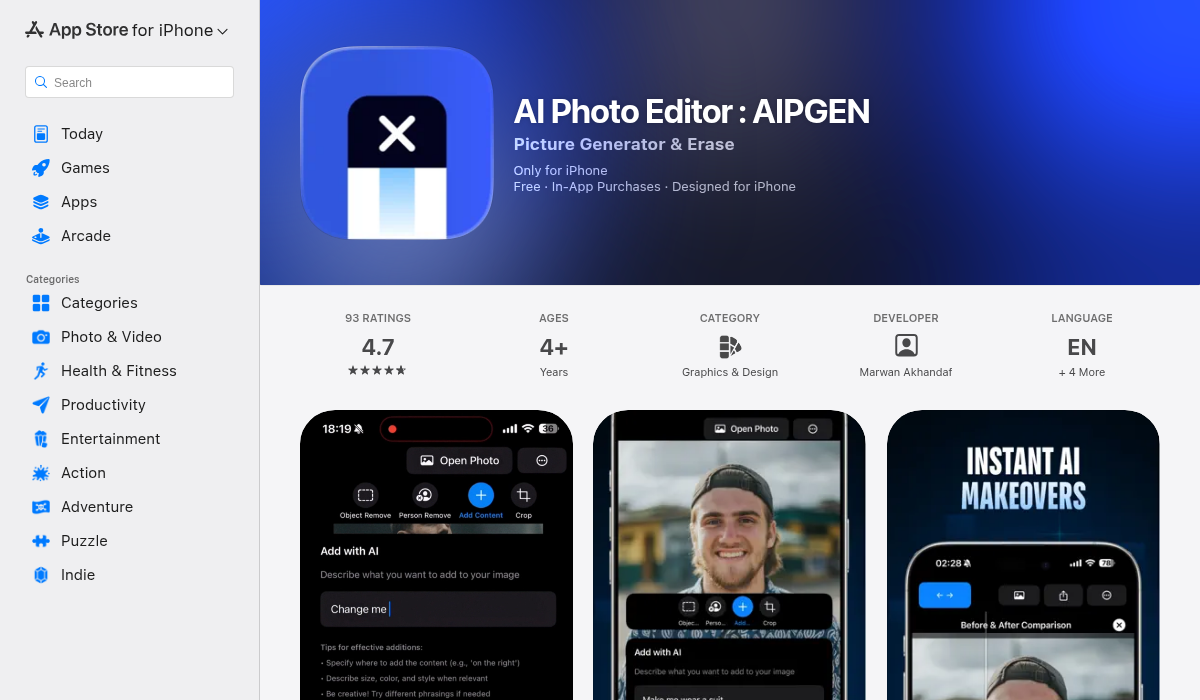
AIPGEN represents the new wave of all-in-one AI editors. Available on both iOS and Android, it combines object removal, photo restoration, and creative editing into a single app with over 60 AI templates. The standout feature? A group photo creator that composites individual portraits into realistic group shots — something no other mobile editor offers.
- ✅ All-in-one: removal, restoration, creative editing
- ✅ 60+ AI templates for quick edits
- ✅ Unique group photo creator feature
- ✅ Cross-platform (iOS and Android)
- ✅ Before/after slider for comparison
- ❌ Subscription model for unlimited edits
Remini
Remini specializes in face enhancement and photo restoration, particularly upscaling low-resolution images. It's excellent for breathing life into old photos but doesn't offer the broader editing toolkit that other options provide.
- ✅ Industry-leading face enhancement
- ✅ Great for upscaling old photos
- ❌ Narrow focus — enhancement only
- ❌ Heavy subscription push
So Which Should You Actually Use?
Let's cut through the noise with practical recommendations based on who you are.
Choose Photoshop if:
- You're a professional designer or photographer billing clients
- You need precise control over every pixel
- You work with complex compositions or high-end retouching
- You're already invested in the Adobe ecosystem
- You need industry-standard file compatibility
Choose AI Photo Editors if:
- You're a content creator, social media manager, or casual user
- Speed matters more than pixel-perfect precision
- You primarily work on mobile
- You want results without the learning curve
- You're budget-conscious or tired of subscriptions
Here's the truth most comparison articles won't tell you: many professionals use both. Photoshop for client work that demands precision, AI editors for quick social posts and personal photos. They're not mutually exclusive.
The Learning Curve Factor
This is where AI editors have an undeniable advantage. Photoshop's depth requires commitment. You'll need to understand layers, masks, blend modes, adjustment layers, and dozens of tool variations before you're truly productive.
AI editors flip this equation. Open the app, load a photo, highlight what you want to change, and the AI handles the rest. Most users become proficient within minutes, not months.
"AI has been great for image extensions, upscaling elements and such, but it's not a replacement for fundamental skills."— Reddit user in r/photoshop
This Reddit user makes a valid point — if you're building a career in design, learning Photoshop fundamentals still matters. But if you're a small business owner who needs to clean up product photos, or a traveler who wants to remove tourists from that perfect shot of the Eiffel Tower, fundamental skills aren't the goal. Results are.
Pro Tips for Getting the Best Results
- Start with AI for the heavy lifting — Use AI tools for object removal and restoration, then fine-tune in a traditional editor if needed. This hybrid approach gives you speed and precision.
- Match the tool to the task — Removing a person from a beach photo? AI editor. Creating a complex composite for a client? Photoshop. Don't force one tool to do everything.
- Use templates when available — Apps like AIPGEN offer 60+ AI templates that can transform photos with a single tap. They're not just filters — they're intelligent adjustments that adapt to your specific image.
- Compare before/after — Always check your edits with a before/after comparison. AI is impressive but not perfect, and a quick review can catch artifacts or odd blending.
- Save your originals — Whether you're using Photoshop or AI editors, always keep the original file. Non-destructive editing should be the standard.
The Bottom Line
The Photoshop vs AI editing debate misses the point. These tools serve different audiences with different needs. Photoshop remains essential for professional workflows where precision and control matter. AI editors excel at making powerful editing accessible to everyone else — faster, cheaper, and with virtually no learning curve.
For most casual users, content creators, and small business owners in 2026, an AI photo editor will handle 90% of their needs at a fraction of the cost and complexity. The 10% that requires Photoshop? You can always add it to your toolkit later.
If you're ready to try the AI approach, AIPGEN offers a free trial edit so you can see the results before committing. With object removal, photo restoration, 60+ AI templates, and that unique group photo feature, it's a solid entry point into modern AI editing.
The best tool is the one you'll actually use. Choose accordingly.