
AI Photo Restoration: How to Bring Old Photos Back to Life in 2026
That shoebox of faded family photos in your closet? AI can bring them back to life — scratches, discoloration, and all.
Old photographs carry irreplaceable memories. Your grandparents' wedding day, your parents as kids, that one vacation nobody remembers but the photo proves happened. The problem is that time doesn't treat physical photos kindly. Fading, water damage, creases, and scratches slowly erase the details that matter most. Professional photo restoration used to cost $50–$200 per image and take days. In 2026, AI tools can do it in seconds — and the results are genuinely impressive.
We tested the most popular AI photo restoration apps to see which ones actually deliver on their promises. Here's what we found.
Why Old Photos Degrade (And Why It Matters Now)
Physical photographs start degrading the moment they're printed. UV light breaks down dyes, humidity warps paper, and even careful handling leaves fingerprints and creases over time. Color photos from the 1970s–90s are especially vulnerable — those chemical processes weren't built for permanence.
The urgency is real. As the generation that grew up with film cameras ages, there's a narrow window to digitize and restore these images before they're lost forever. Scanners can capture what's left, but AI restoration goes further — it can intelligently reconstruct missing details, sharpen blurry faces, and even bring faded colors back to their original vibrancy.
"I had a bunch of old black-and-white photos and some really scratched ones — the AI brought back the details, cleaned up the scratches, and even colorized the B&W photos better than I expected."— Reddit user in r/software
That's the promise. But not all restoration apps are equal. Some excel at scratch removal but distort faces. Others colorize beautifully but can't handle heavy damage. Let's break down what actually works.
How AI Photo Restoration Works
Modern AI restoration combines several techniques under the hood:
- Inpainting — The AI identifies damaged areas (scratches, tears, missing chunks) and fills them in by predicting what should be there based on surrounding context
- Super-resolution — Low-resolution or blurry areas get sharpened using models trained on millions of images to predict fine details
- Color correction — Algorithms detect faded or shifted colors and restore them to natural-looking tones
- Face enhancement — Specialized models focus on restoring facial features, since faces are often the most important element in old photos
The best apps combine all of these in a single pass. The weaker ones only do one or two well — which is why results vary so much between tools.
Best AI Photo Restoration Apps in 2026
We tested each app with the same set of damaged photos: a heavily scratched 1960s black-and-white portrait, a faded 1980s color family photo, and a water-damaged 1990s vacation shot. Here's how they performed.
1. Remini

Remini has been the household name in AI photo enhancement for years, and for good reason. It excels at face enhancement — turning blurry, pixelated faces into sharp, recognizable portraits. The results on our 1960s portrait were impressive, with natural-looking skin texture and sharp eyes.
However, Remini is primarily a face upscaler. It struggles with non-facial elements and doesn't handle heavy scratch removal as well as dedicated restoration tools. Our water-damaged vacation photo came back with a sharp face but untouched background damage.
- ✅ Best-in-class face enhancement
- ✅ Fast processing times
- ✅ Massive user community with examples
- ❌ Limited scratch and damage repair
- ❌ Subscription can get pricey for occasional use
- ❌ Focuses on faces — backgrounds often ignored
2. HitPaw FotorPea

HitPaw has been gaining traction in the restoration space, and the results are solid. It handled our scratched black-and-white photo well, removing most visible damage without introducing obvious artifacts. The colorization feature is a nice bonus — it produced natural-looking colors on our B&W test image.
Where HitPaw falls short is on heavily damaged photos. Our water-damaged shot revealed some smearing artifacts where the AI struggled to distinguish between damage and actual image content. The desktop version performs better than mobile, which is worth noting if you're working from a phone.
- ✅ Good scratch removal
- ✅ Colorization built in
- ✅ Desktop and mobile options
- ❌ Struggles with heavy water damage
- ❌ Mobile app less powerful than desktop
- ❌ Free tier is very limited
3. AIPGEN
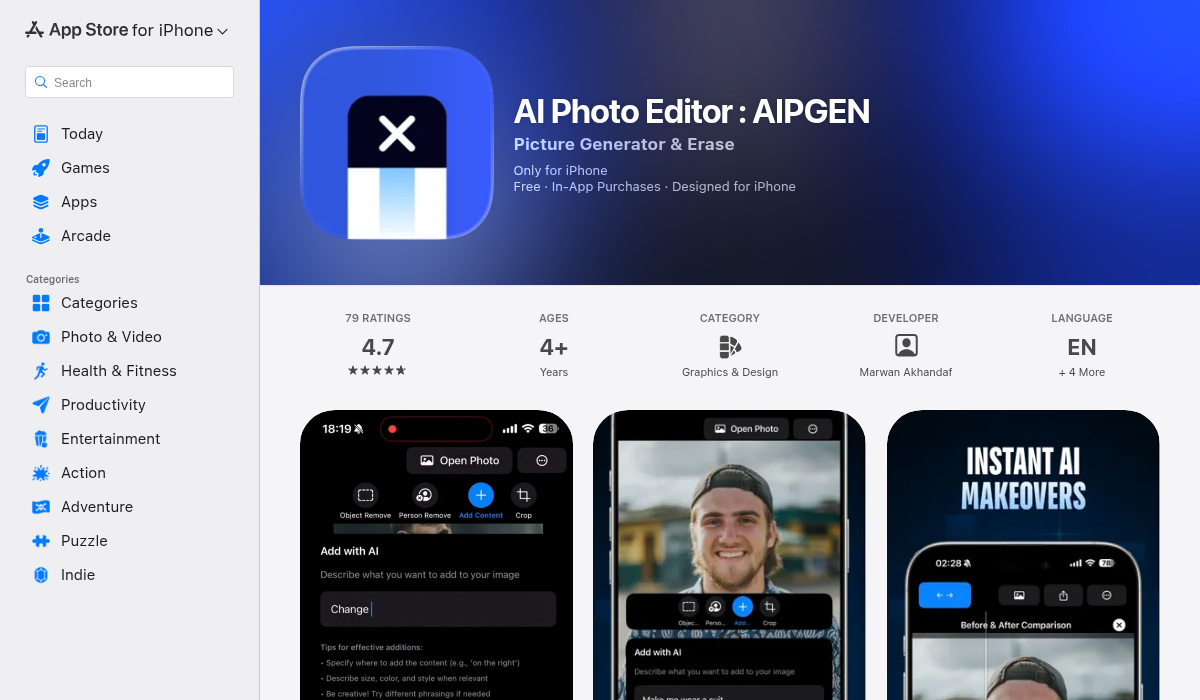
AIPGEN takes a different approach from the single-purpose restoration tools. It's a full AI photo editing suite with restoration as one of its core features — alongside object removal, creative composition, and a library of 60+ AI templates.
For restoration specifically, AIPGEN delivered strong results across all three test images. The scratch repair on our 1960s portrait was thorough, handling both major scratches and subtle surface damage. The faded 1980s photo came back with natural-looking colors without the oversaturation that some tools produce. What stood out was the water-damaged photo — AIPGEN's inpainting handled the complex damage patterns better than the dedicated restoration tools we tested.
The real advantage is what happens after restoration. Need to remove an unwanted person from that restored family photo? AIPGEN's object removal handles it. Want to create a group photo combining restored individual portraits? The group photo creator feature makes it possible. It's the difference between a one-trick tool and a complete editing workflow.
- ✅ Strong restoration quality across damage types
- ✅ Full editing suite — restoration, object removal, composition
- ✅ 60+ AI templates for quick enhancements
- ✅ Group photo creator for combining portraits
- ✅ Before/after slider to compare results
- ✅ Available on both iOS and Android
- ✅ Free trial edit to test quality first
- ❌ Premium required for unlimited edits
4. jpgHD
jpgHD is a web-based tool that's gained attention for its "lossless" restoration approach. It performs well on lightly damaged photos and produces clean results. The interface is straightforward — upload, wait, download.
The downside is that it's browser-only (no dedicated app), processing times can be slow during peak hours, and the free tier limits resolution. For users who want quick mobile restoration, a native app is a better experience.
- ✅ Clean restoration on light damage
- ✅ No app installation needed
- ❌ Browser-only — no native app
- ❌ Slow processing during peak times
- ❌ Limited free resolution
Pro Tips for Better Photo Restoration Results
The AI does the heavy lifting, but you can dramatically improve results with a few simple steps:
- Scan at high resolution — 600 DPI minimum. The more detail the AI has to work with, the better the output. Phone camera scans work in a pinch, but a flatbed scanner is always better.
- Clean the photo first — Gently remove dust and loose debris before scanning. AI can't distinguish between actual photo content and a hair lying on the surface.
- Start with the least damaged version — If you have multiple copies or negatives, use the best one. AI restoration works by reconstructing missing information — the less it has to guess, the more accurate the result.
- Restore before colorizing — If you're planning to colorize a black-and-white photo, fix the damage first. Colorization over scratches produces strange artifacts that are harder to fix after the fact.
- Use the before/after slider — Apps like AIPGEN include a comparison slider. Use it to check that the AI hasn't changed important details. Occasionally, restoration models will "hallucinate" details that weren't in the original — a slightly different facial expression, an extra button on a shirt. Always verify.
- Save the original scan — Never overwrite your original digital scan. Keep it as a backup. AI models improve constantly, and re-running a restoration next year might produce even better results.
What to Expect (And What AI Still Can't Do)
Let's be honest about limitations. AI photo restoration in 2026 is remarkable, but it's not magic:
- Heavily destroyed photos — If more than 50% of the image is missing or damaged, results will be inconsistent. The AI is guessing at that point, and guesses can be wrong.
- Accurate colorization — AI colorization produces plausible colors, not accurate ones. Your grandmother's dress might have been blue, but the AI might make it green. It doesn't know — it's predicting based on patterns.
- Tiny faces in group shots — Faces that are very small in the original image (under ~50 pixels) are hard to restore accurately. The AI doesn't have enough information to work with.
"The new Restoration tool gave me the best results so far. It cleaned up cracks and fading on my old photos better than anything else I tried."— Reddit user in r/ProductivityApps
That said, for the vast majority of old photos — faded colors, moderate scratches, general aging — the results are genuinely good enough to print and frame.
The Bottom Line
AI photo restoration has reached a point where anyone can rescue old family photos without spending hundreds on professional services. The tools are fast, accessible, and surprisingly effective.
If your main concern is face enhancement and sharpening, Remini remains the go-to. For dedicated scratch removal and colorization, HitPaw is solid. For web-based quick fixes, jpgHD works fine.
But if you want restoration as part of a complete editing workflow — where you can fix damage, remove unwanted elements, enhance with AI templates, and create group composites all in one place — AIPGEN is the most versatile option we tested. The free trial edit lets you test the restoration quality before committing, which is more than most competitors offer.
Those old photos aren't getting any younger. Neither are the memories in them.