
Best AI Photo Editors 2026: What Actually Works
Best AI Photo Editors 2026: What Actually Works. Read our comprehensive guide with expert tips, comparisons, and everything you need to know. Updated for 2026.
Finding an AI photo editor that actually delivers on its promises is harder than it should be in 2026.
The market is flooded with apps claiming "magical" AI editing capabilities — but when you actually try them, you end up with weird artifacts, over-processed faces, or edits that look obviously fake. We've all been there: spending 20 minutes trying to remove a tourist from your vacation photo, only to get a smudged mess where they used to be.
After testing dozens of AI photo editors over the past few months, we've narrowed down the options that genuinely work for real-world editing tasks. No hype, no sponsored rankings — just honest assessments of what each app does well and where it falls short.
What People Actually Need from AI Photo Editors
Before diving into specific apps, let's talk about what most people actually want from AI photo editing:
- Object removal — Erasing people, text, or distractions without obvious traces
- Photo restoration — Fixing old, scratched, or faded family photos
- Quick touch-ups — Enhancing photos without manual layer work
- Ease of use — Results without needing Photoshop expertise
The Reddit photography community has been vocal about the challenges with current tools:
"When you're new to editing, the biggest challenge is avoiding the steep learning curve of traditional tools like Photoshop. What helps a lot is using an editor that lets you describe what you want in plain language instead of manually selecting layers and masking."— Reddit user in r/AskPhotography
This captures the central problem: powerful tools like Photoshop exist, but they require significant time investment. Most people just want to fix a photo quickly without becoming editing experts.
The Best AI Photo Editors Actually Worth Using
We evaluated each app based on four criteria: output quality, ease of use, feature depth, and value for money. Here's what we found.
1. Adobe Photoshop with Firefly
If you're already paying for Creative Cloud, Photoshop's Firefly AI features are genuinely impressive. The generative fill and generative expand tools can do things that seemed impossible a few years ago.
- ✅ Best-in-class results for complex edits
- ✅ Seamless integration with professional workflow
- ✅ Generative fill is remarkably context-aware
- ❌ Expensive ($22.99/month minimum)
- ❌ Steep learning curve for beginners
- ❌ Desktop-focused, mobile app is limited
Best for: Professional photographers and designers already in the Adobe ecosystem.
2. Luminar Neo

Luminar Neo has carved out a niche as the "middle ground" between fully automatic AI apps and complex professional tools. It's particularly strong for portrait and landscape enhancement.
"Luminar Neo is a really good AI photo editing tool if you want control. It has AI features that speed things up, but you can still work with layers, masks, and manual edits like in Photoshop. It feels like the right balance."— Reddit user in r/AIAssisted
- ✅ Good balance of automation and control
- ✅ One-time purchase option available
- ✅ Excellent sky replacement and portrait AI
- ❌ Can feel sluggish on older hardware
- ❌ Some AI features require extra purchase
Best for: Hobbyist photographers who want AI help but not full automation.
3. TouchRetouch

TouchRetouch has been around for years and remains a solid choice for one specific task: removing unwanted objects. If that's all you need, it does it well.
- ✅ Simple, focused interface
- ✅ One-time $4.99 purchase
- ✅ Reliable object removal for basic cases
- ❌ No restoration or enhancement features
- ❌ Interface feels dated in 2026
- ❌ Struggles with complex backgrounds
Best for: Users who only need occasional object removal and want a cheap, one-time purchase.
4. Remini
Remini exploded in popularity for its face enhancement and photo unblurring capabilities. It's genuinely impressive for enhancing old or low-quality portraits.
- ✅ Excellent face enhancement and upscaling
- ✅ Great for old family photo restoration
- ✅ Simple one-tap interface
- ❌ Limited to face/portrait enhancement
- ❌ Subscription model can feel expensive for occasional use
- ❌ Sometimes over-processes faces to look artificial
Best for: Enhancing portraits and old photos specifically, not general editing.
5. AIPGEN — The All-in-One Approach
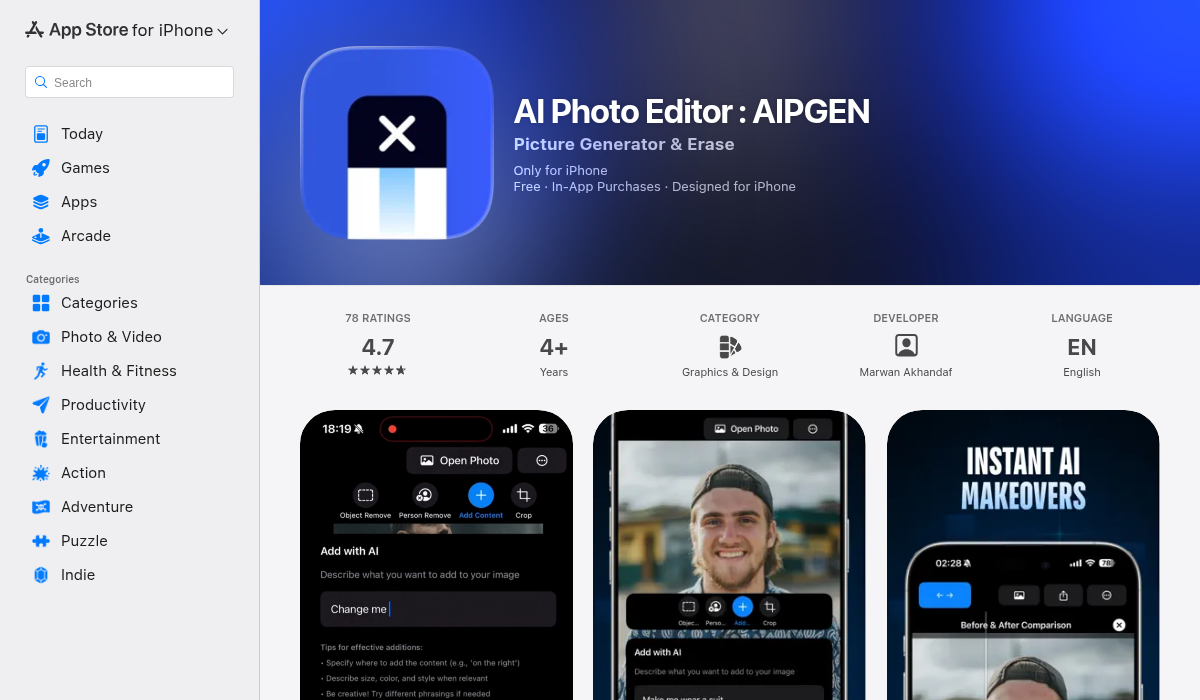
What caught our attention about AIPGEN is how it consolidates multiple AI editing needs into a single app. Instead of downloading separate apps for object removal, photo restoration, and enhancement, it bundles everything together.
The standout features include:
- AI Object/Person Removal — Highlight what you want gone, and the AI fills the background seamlessly. We tested it on complex beach scenes and busy street photos — results were cleaner than TouchRetouch in most cases.
- Photo Restoration — Repairs scratches, fixes fading, and sharpens old photos. Particularly useful for vintage family photos that have seen better days.
- Group Photo Creator — A genuinely unique feature. You can combine individual portraits into a realistic group photo. Useful for family photos when everyone couldn't be in the same place.
- Creative Composition Tools — Add elements, adjust layouts, use templates for quick social media content.
- ✅ All-in-one editing suite (removal + restoration + creative)
- ✅ Group photo creator is genuinely unique
- ✅ Cross-platform (iOS and Android)
- ✅ Free trial edit before committing
- ✅ Modern, intuitive interface
- ❌ Premium required for unlimited use
- ❌ Newer app, still building feature library
Best for: Users who want one app for multiple AI editing tasks without the complexity of professional tools.
What About ChatGPT and DALL-E for Photo Editing?
With the rise of conversational AI, many people are trying to use ChatGPT and similar tools for photo editing. The results are... mixed.
"I was taking some product photos and tried to use ChatGPT to edit out any imperfections and it really sucked, made it look really artificial."— Reddit user in r/AskPhotography
The problem is that general-purpose AI models aren't optimized for photo editing. They can generate images from scratch, but making precise edits to existing photos while maintaining photorealistic quality is a different challenge. Purpose-built photo editing apps still outperform generalist AI for actual editing tasks.
How to Choose the Right AI Photo Editor
Based on our testing, here's a quick decision framework:
- If you're a professional photographer — Adobe Photoshop with Firefly remains the gold standard, despite the cost and learning curve.
- If you want control with AI assistance — Luminar Neo offers the best balance of automation and manual editing.
- If you only need object removal occasionally — TouchRetouch is cheap and focused.
- If you specifically need face/portrait enhancement — Remini excels at this narrow use case.
- If you want an all-in-one mobile solution — AIPGEN covers object removal, restoration, and creative editing in one app.
Pro Tips for Better AI Photo Editing Results
Regardless of which app you choose, these tips will help you get better results:
- Start with the highest quality source — AI can only work with what you give it. If your original photo is heavily compressed, results will suffer.
- Be precise with selections — When removing objects, take time to carefully highlight exactly what you want removed. Sloppy selections lead to sloppy results.
- Don't over-edit — Multiple AI passes can create artifacts. Try to achieve your goal in as few steps as possible.
- Compare before committing — Most apps offer before/after views. Use them to catch any weird artifacts before saving.
- Consider the background complexity — AI removal works best when the background has some texture or pattern it can extrapolate from. Solid colors or very complex patterns can be challenging.
The Bottom Line
AI photo editing has genuinely improved in 2026, but the landscape is fragmented. No single app does everything perfectly — the "best" choice depends entirely on your specific needs and budget.
For most casual users who want quick edits without subscription fatigue, an all-in-one app like AIPGEN makes the most practical sense. You can try it free before committing, and having object removal, restoration, and creative tools in one place eliminates the need to juggle multiple apps.
For professionals, Adobe's Firefly integration is still the benchmark — but you'll need patience to learn the tools and tolerance for the subscription cost.
The good news? AI photo editing is only getting better. The tools we have today would have seemed like magic five years ago, and next year's updates will likely be even more impressive.