
Best AI Tools for Product Photography 2026
Product photography can make or break your sales — and in 2026, AI is changing how everyone from Etsy sellers to Amazon FBA owners creates professional product images without expensive studio setups.
Whether you're launching a new product line or refreshing your existing listings, the right AI tool can transform a decent smartphone photo into something that looks like it came from a professional shoot. We've tested the most talked-about tools on Reddit and review sites to see which actually deliver on their promises.
Why AI Product Photography Tools Are Essential in 2026
Traditional product photography requires a studio, lighting equipment, editing software, and either significant time investment or budget for a professional photographer. For small businesses and solo entrepreneurs, this creates an immediate barrier to competing with larger brands.
AI-powered tools have dramatically lowered this barrier. Modern AI can remove cluttered backgrounds, enhance lighting, upscale low-resolution images, and even generate entirely new backgrounds — all from a single smartphone photo.
"AI is a great tool for the basics, but mixing it with traditional methods gives you the best results. For hero shots or anything brand-defining, you might still want professional photography — but for scaling your catalog? AI saves hours."— Reddit user in r/ecommerce
What to Look for in AI Product Photography Tools
Before diving into specific tools, here's what actually matters when choosing one:
- Object isolation quality — How cleanly can it separate your product from the background?
- Background generation — Does it offer realistic lifestyle backgrounds or just solid colors?
- Batch processing — Can you process multiple products quickly?
- Lighting correction — Will it fix shadows and exposure issues?
- Mobile accessibility — Can you edit on the go from your phone?
- Pricing — Per-image costs vs. subscriptions for frequent users
Best AI Tools for Product Photography Compared
1. Remini — Best for Image Enhancement

Remini has built its reputation on AI upscaling and face enhancement. For product photography, it excels at taking lower-resolution images and sharpening them for web use.
The app uses neural network technology to add detail to blurry or pixelated photos. This is particularly useful when you only have smartphone photos and need them to look crisp on your website.
- ✅ Excellent upscaling and sharpening
- ✅ Fast processing time
- ✅ Good for batch enhancement
- ❌ Limited editing features beyond enhancement
- ❌ No object removal tools
- ❌ Primarily focused on portraits, not products
Remini works well as part of a workflow — enhance your images there, then use another tool for background removal or object cleanup.
2. Adobe Firefly — Best for Enterprise Teams
Adobe's AI offering integrates directly with Creative Cloud, making it ideal for teams already using Photoshop and Lightroom. Generative Fill lets you extend backgrounds, remove objects, and create variations of your product shots.
The enterprise-level features include commercial licensing for AI-generated content (important for brands worried about copyright), collaboration tools, and batch processing through Adobe Express.
- ✅ Seamless Creative Cloud integration
- ✅ Commercial licensing included
- ✅ Powerful generative fill for background extension
- ❌ Expensive for small businesses
- ❌ Steeper learning curve
- ❌ Requires desktop for full features
3. Magic Studio — Best Free Option
Magic Studio offers a web-based platform that handles background removal and basic edits without any software installation. It's frequently mentioned in Reddit discussions as a solid free starting point for sellers just getting into AI photography.
- ✅ Free tier available
- ✅ No software installation required
- ✅ Clean background removal
- ❌ Limited advanced features
- ❌ Web-only (no mobile app)
- ❌ Results can look generic
4. AIPGEN — Best All-in-One Mobile Solution
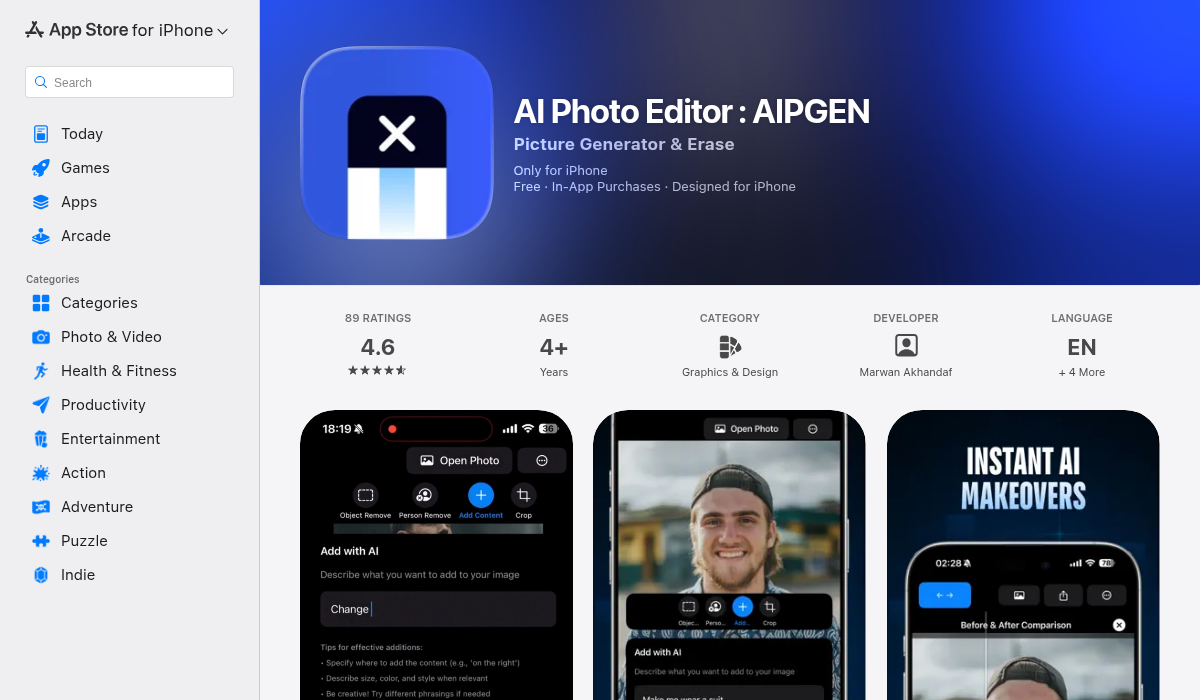
AIPGEN stands out as a comprehensive mobile editing suite that covers nearly every product photography need in one app. While it's not exclusively designed for product photos, its feature set addresses the most common pain points for sellers.
The AI object removal tool lets you eliminate distracting backgrounds, unwanted shadows, or any clutter around your product. Point at what you want gone, and the AI fills the space intelligently with no obvious marks or artifacts.
What makes AIPGEN particularly useful is the 60+ AI templates for quick edits. Instead of manually adjusting every setting, you can apply pre-built styles that enhance your products consistently across your entire catalog.
- ✅ All-in-one: object removal, enhancement, filters, text overlays
- ✅ 60+ AI templates for consistent styling
- ✅ In-app camera for direct capture
- ✅ Before/after slider for comparing edits
- ✅ Cross-platform (iOS and Android)
- ✅ My Photos gallery to manage all edited images
- ❌ Mobile-only (no desktop version)
For sellers who shoot product photos on mobile and want to edit on the same device, AIPGEN eliminates the workflow friction of transferring files between devices and apps.
5. Topaz Photo AI — Best for Desktop Quality
Topaz gets frequent mentions in r/photography for professional-grade results. It combines noise reduction, sharpening, and upscaling in a single tool that outperforms most competitors on technical quality.
The batch processing capability makes it practical for processing entire product catalogs. You can set parameters once and let it run through hundreds of images overnight.
- ✅ Industry-leading noise reduction
- ✅ Excellent batch processing
- ✅ One-time purchase option
- ❌ Desktop only
- ❌ Higher upfront cost
- ❌ No background removal or creative tools
How to Get the Best Results from AI Product Photography
No AI tool can fully compensate for a terrible source image. Here's how to maximize what these tools can do:
- Start with decent lighting — Natural light near a window beats harsh flash. AI can improve lighting, but it can't create what isn't there.
- Shoot against a clean background — Even if you plan to remove it, a simple white or solid background gives AI less work to do, resulting in cleaner edges.
- Capture multiple angles — AI can enhance what exists but can't generate new perspectives. Shoot more than you think you need.
- Use the highest resolution your phone allows — Upscaling works better when there's more source data to work with.
- Check edges after AI processing — Background removal sometimes leaves subtle halos or artifacts. Zoom in and verify before publishing.
Workflow Recommendations by Business Size
Solo Sellers (Under 50 Products)
A single all-in-one mobile tool like AIPGEN handles everything without the complexity of managing multiple subscriptions. Shoot on your phone, edit in the same app, export directly to your listings.
Small Teams (50-500 Products)
Consider combining Topaz Photo AI for batch enhancement with AIPGEN for creative edits and object removal. This gives you desktop power for large batches plus mobile flexibility for quick fixes.
Enterprise (500+ Products)
Adobe Firefly with Creative Cloud integration provides the commercial licensing, collaboration features, and API access needed at scale. The investment pays off when you're processing thousands of images.
What Reddit Users Actually Say
We dug through r/ecommerce, r/photography, and r/productphotography to find what real users are saying about AI product photography tools:
"Sometimes the images look a bit off or generic, so for hero shots or anything brand-defining, traditional photography still wins. But for scaling your catalog and getting consistent backgrounds? AI saves days of work."— Reddit user in r/ecommerce
The consensus: AI tools are excellent for workflow efficiency but shouldn't completely replace thoughtful product photography for your flagship items.
The Bottom Line
The best AI product photography tool depends entirely on your workflow and scale:
- Need everything on mobile? — AIPGEN covers removal, enhancement, and styling in one app
- Already in Adobe ecosystem? — Firefly integrates seamlessly and includes commercial rights
- Processing large batches on desktop? — Topaz Photo AI delivers professional-grade results
- Just starting out? — Magic Studio's free tier lets you experiment without commitment
The technology has matured enough that budget is no longer an excuse for poor product photos. Whether you're selling handmade jewelry on Etsy or scaling an Amazon FBA business, there's an AI tool that fits your workflow and budget.
If you're looking for an all-in-one solution that handles everything from object removal to batch styling on mobile, AIPGEN is worth trying — the free trial edit lets you test its capabilities before committing.