
ChatGPT Image Generator Prompts for Product Photos (2026)
Professional product photography used to cost $500+ per shoot. In 2026, AI image generators can create stunning product photos for free—if you know the right prompts.
Whether you're an Amazon seller, Etsy creator, or small business owner, the quality of your product images directly impacts your sales. Studies show that 75% of online shoppers rely on product photos when making purchase decisions. But hiring photographers, renting studios, and coordinating shoots isn't always realistic—especially when you're testing new products or operating on thin margins.
This guide covers the exact prompts that work with ChatGPT's image generator (DALL-E 3), plus tips for editing and enhancing your results for truly professional output.
Why AI Product Photography Works Now
Early AI image generators struggled with product photography. Images looked artificial, lighting was inconsistent, and products often came out distorted. That changed dramatically in late 2024 when DALL-E 3 and Midjourney v6 introduced significantly improved photorealism.
Today's AI generators can produce:
- ✅ Realistic studio lighting and shadows
- ✅ Consistent product angles and perspectives
- ✅ Professional backgrounds (solid colors, lifestyle scenes, gradient sweeps)
- ✅ Multiple variations for A/B testing
The caveat? You still need your actual product photo as a reference, and you'll likely need to do some editing afterward. That's where combining AI generators with AI photo editors creates a powerful workflow.
Essential Prompt Structure for Product Photos
The secret to great AI product images is structured prompting. Here's the formula that consistently works:
[Product description] + [Setting/Background] + [Lighting style] + [Camera/Lens reference] + [Additional modifiers]
Example Prompts That Work
1. Clean E-commerce Style
Professional product photography of a [your product], centered on pure white background, soft diffused studio lighting, shot with 85mm lens at f/2.8, subtle shadow beneath, commercial catalog style, 8K resolution, hyperrealistic2. Lifestyle Scene
[Your product] placed on a marble countertop in a bright minimalist kitchen, morning sunlight streaming through window, shallow depth of field, editorial magazine style, natural tones, aspirational lifestyle photography3. Hero Shot
Dramatic hero shot of [your product], floating against dark gradient background, rim lighting highlighting edges, professional product photography, high-end advertising campaign style, cinematic lighting4. Flat Lay
Top-down flat lay photography of [your product] with complementary props, on textured linen background, soft overhead lighting, Instagram-ready aesthetic, styled product shot, negative space for text5. In-Use/Action Shot
[Your product] being used by hands only (no face), neutral background, demonstrating [key feature], natural lighting, authentic lifestyle photography, focus on product functionalityCategory-Specific Prompts
Food & Beverage Products
Appetizing product shot of [food product], steam rising, rustic wooden surface, warm golden hour lighting, 100mm macro lens, shallow depth of field, food magazine editorial style, mouth-watering presentationBeauty & Skincare
Luxurious beauty product photography of [skincare item], water droplets on surface, soft pink and white gradient background, dewy fresh aesthetic, high-end cosmetics advertising style, clean minimal compositionElectronics & Tech
Sleek tech product photo of [device], reflective black surface, dramatic rim lighting, minimalist Apple-inspired aesthetic, floating slight angle, premium electronics catalog style, clean modern designFashion & Accessories
Editorial fashion photography of [accessory], artfully draped fabric background, soft directional lighting, muted color palette, high-end boutique style, detail-focused compositionHome & Garden
[Home product] in a styled living room setting, natural light from large windows, Scandinavian minimalist interior, lifestyle context shot, aspirational home decor photography, warm and inviting atmosphereAdvanced Prompt Techniques
1. Specify What to Avoid
Adding negative prompts helps prevent common issues:
...avoid: text, watermarks, distorted shapes, unrealistic proportions, artificial looking, stock photo feel2. Reference Professional Styles
...shot in the style of high-end Amazon product photography, similar to Apple product launches, Dyson advertising aesthetic3. Control Mood with Color
...warm golden tones for comfort products
...cool blue tones for tech and professional items
...muted earth tones for organic and natural products
...vibrant saturated colors for youth-oriented products
4. Specify Technical Details
...shot on Sony A7R IV with 90mm macro lens, f/8 for sharpness, focus stacking, medium format digital qualityThe Post-Generation Workflow
AI-generated product photos are rarely perfect on the first try. Here's the workflow professional sellers use:
- Generate 4-8 variations — Create multiple options to choose from
- Select the best base image — Look for accurate proportions and good composition
- Remove unwanted elements — AI sometimes adds artifacts or imperfections
- Enhance lighting and colors — Adjust to match your brand style
- Add your actual product — Replace the AI product with your real photo for authenticity
This is where dedicated photo editing tools become essential.
AIPGEN — Edit AI-Generated Product Photos on Mobile
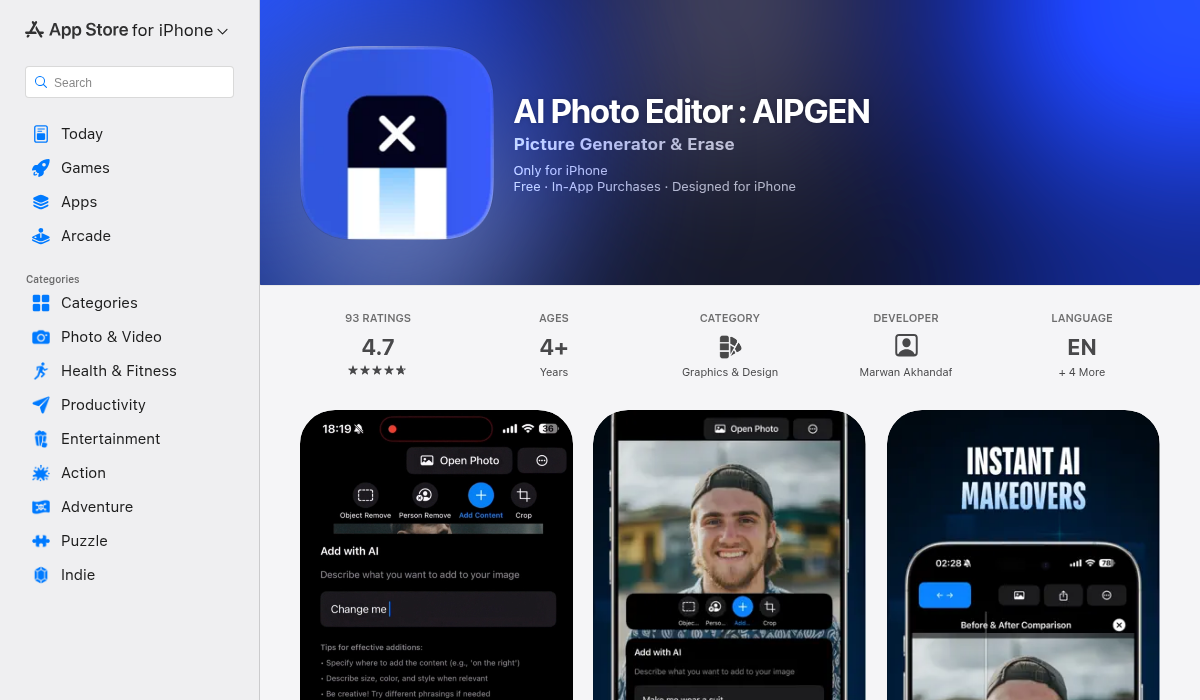
After generating your base image with ChatGPT, you'll often need to remove unwanted elements, swap backgrounds, or combine your real product photo with an AI-generated scene. AIPGEN handles all of this directly on your phone.
Key features for product photography workflows:
- ✅ Object removal — Clean up artifacts AI generators sometimes add
- ✅ Background replacement — Swap AI backgrounds or remove them entirely
- ✅ Person removal — Remove hands or models if they distracted from the product
- ✅ Before/after slider — Perfect for creating comparison content
- ✅ 60+ AI templates — Quick enhancement styles for consistent branding
- ✅ Batch editing — Process multiple product images with the same style
The workflow: generate with ChatGPT → refine with AIPGEN → publish to your store. No desktop software required.
Download AIPGEN for iOS | Download for Android
Common Mistakes to Avoid
1. Using AI Images Without Real Product Reference
AI doesn't know what your actual product looks like. Always start with a real photo and use AI to enhance backgrounds/settings, not invent the product from scratch.
2. Over-Promising Visual Quality
If your AI-enhanced image shows a product looking significantly better than reality, you'll get returns and bad reviews. Keep it honest.
3. Ignoring Platform Requirements
Amazon, eBay, and Etsy have specific image guidelines. White backgrounds, minimum dimensions, and no promotional text. Check before generating.
4. Single Image Syndrome
Don't use just one photo. Generate multiple angles, use cases, and contexts. Listings with 5+ images significantly outperform single-image listings.
5. Forgetting Mobile Optimization
Most shoppers browse on phones. Ensure your product is visible and compelling even at thumbnail size.
Pro Tips for Better Results
- Start with the best real photo you can take — Even smartphone photos work, but good lighting matters. Natural light near a window works wonders.
- Iterate your prompts — Save prompts that work well and build a library. Small tweaks can dramatically change results.
- Match your brand aesthetic — Consistency across all product images builds trust. Use the same lighting style and color palette.
- A/B test different styles — Generate both clean white background and lifestyle images. Test which performs better for your audience.
- Combine AI strengths — Use ChatGPT for backgrounds and scenes, then use AIPGEN for refinement and object manipulation.
The Bottom Line
AI image generation has transformed what's possible for small sellers and creators. What used to require professional photographers, studios, and significant budgets can now be accomplished with the right prompts and a good editing app.
The key is understanding that AI generators are tools for enhancement, not replacement. Start with real product photos, use AI to create professional contexts and backgrounds, and refine with editing tools like AIPGEN.
Your smartphone is now your product photography studio. The only thing left is your creativity—and the prompts in this guide give you everything you need to start.
What prompts have worked best for your products? The techniques keep evolving, and experimenting is half the fun.