
How to Create Videos from Text with AI: Best Tools in 2026
A year ago, creating video from text was a novelty — impressive demos that rarely worked for practical use. In 2026, AI video generation has crossed the threshold from "cool tech demo" to genuinely useful creative tool. If you've been wondering whether it's ready for your projects, the answer is finally yes.
The explosion of AI video generators means there's now a tool for almost every use case — from quick social clips to polished marketing content. But with dozens of options available, choosing the right one can feel overwhelming. Let's cut through the noise and look at what actually works.
The State of AI Video Generation in 2026
Text-to-video AI has made remarkable progress. The best models now produce clips with coherent motion, realistic physics, and good prompt adherence. That said, expectations matter: we're talking about short clips (typically 5-15 seconds) rather than full-length videos, and complex scenes still require careful prompting.
The major players have split into two camps: cloud-based platforms with powerful models (like Google's Veo 3.1 and OpenAI's Sora 2) and mobile apps designed for quick, accessible creation. Both have their place depending on your needs.
"Google's Veo 3.1 model is the best AI video generation all-arounder on the market. With strong prompt adherence to stick close to your image references and text prompts, great realism combining video..."— Zapier's 2026 AI Video Generator Roundup
Understanding Text-to-Video: What to Expect
Before diving into specific tools, it helps to understand what AI video generation can and can't do:
What works well:
- Single subjects with simple motion (person walking, object rotating)
- Abstract and artistic visuals
- Atmospheric scenes (landscapes, cityscapes, nature)
- Style-specific content (cinematic, anime, vintage)
- Image-to-video (animating still photos)
What's still challenging:
- Complex multi-character scenes with interactions
- Specific text appearing correctly in videos
- Maintaining character consistency across clips
- Videos longer than 15-20 seconds
- Precise control over timing and motion
Setting realistic expectations helps you use these tools effectively rather than fighting against their limitations.
Top AI Video Generators Compared
1. Google Veo 3.1 (via Gemini)
Google's latest video model has emerged as the current benchmark for quality. Available through Gemini, Veo 3.1 generates videos with synchronized sound — a significant advancement over silent clips. The prompt adherence is excellent, meaning what you describe is what you get.
- ✅ Best-in-class video quality
- ✅ Audio generation included
- ✅ Strong prompt understanding
- ❌ Requires Gemini subscription
- ❌ Can be slow for complex prompts
- ❌ Desktop/web interface only
2. OpenAI Sora 2
Sora remains a powerful option, particularly for cinematic-style content. The "cameo" feature for character overlay is useful for creating consistent characters across scenes. Available on iOS and desktop.
- ✅ Cinematic quality output
- ✅ Character consistency features
- ✅ Good prompt understanding
- ❌ Premium pricing
- ❌ Generation times can be long
3. Canva AI Video
Canva's integrated video generator is perfect for content creators already in the Canva ecosystem. It generates clips with synchronized audio including dialogue and sound effects — great for social media content.
- ✅ Integrated with Canva's design tools
- ✅ Audio generation included
- ✅ Easy export to social formats
- ❌ Quality below dedicated video AI tools
- ❌ Limited creative control
4. AIVGEN – AI Video Generator
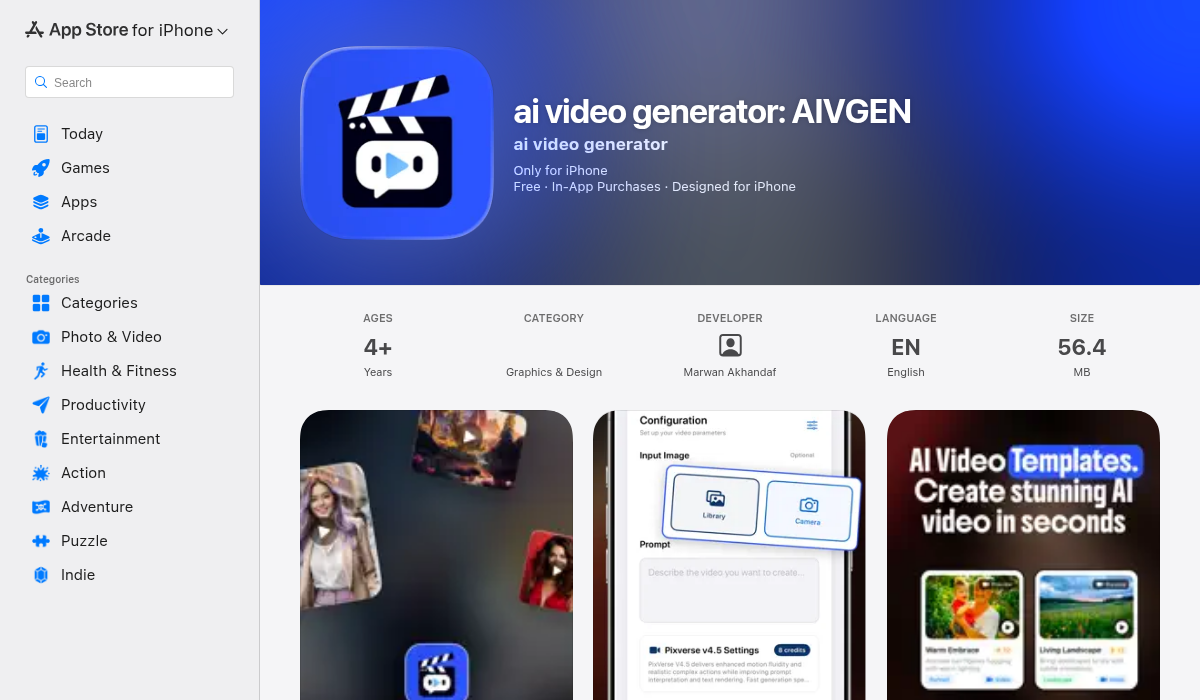
For mobile-first video creation, AIVGEN stands out by offering access to multiple AI video models in a single app. Rather than committing to one model's style, you can choose from 9 different AI engines depending on what you're creating.
The smart templates system helps if you're not sure where to start — instead of crafting prompts from scratch, you can pick a template and customize it. For those who do know what they want, the text and image input options give you full control over the generation.
- ✅ 9 different AI video models
- ✅ Background processing (use your phone while generating)
- ✅ Text and image inputs supported
- ✅ Smart templates for quick starts
- ✅ Credit-based pricing (pay for what you use)
- ❌ iOS only
The background processing is particularly useful — video generation can take time, and being able to close the app while your video renders (and get notified when it's done) beats staring at a progress bar.
5. Pika 2.5
Pika has carved out a niche with excellent motion quality and interesting creative effects. The free tier is limited to 480p, but the motion coherence is impressive for quick iterations.
- ✅ Excellent motion quality
- ✅ Creative effects options
- ✅ Fast generation
- ❌ Free tier limited to 480p
- ❌ Less realistic than competitors
Practical Use Cases That Actually Work
After testing these tools extensively, here's where AI video generation genuinely shines:
Social media content: Short, eye-catching clips for Instagram Reels, TikTok, or YouTube Shorts. AI excels at creating scroll-stopping visuals that would be impossible to film.
Concept visualization: Show clients or collaborators what you're imagining before investing in production. A 10-second AI clip can communicate more than a page of description.
Animated photos: Turn static images into subtle motion — clouds moving, water rippling, hair blowing. The "living photo" effect is one of AI video's strongest applications.
B-roll and backgrounds: Abstract or atmospheric footage to supplement traditional video. Nobody notices AI-generated clouds in the background of a talking head video.
Prototyping ideas: Test whether a concept works before committing to production. Iterate through variations quickly.
Pro Tips for Better AI Videos
- Be specific about motion — Don't just describe what's in the scene; describe what's happening. "A woman walks slowly through autumn leaves, her red coat contrasting with the orange foliage" beats "woman in forest."
- Reference real cinematography — Terms like "tracking shot," "shallow depth of field," or "golden hour lighting" help AI understand the visual style you want.
- Start with images — If you have a specific look in mind, image-to-video often produces better results than text-to-video. Generate or find a still image first, then animate it.
- Keep it simple — The best AI videos focus on one subject doing one thing. Complex multi-element scenes are where AI struggles most.
- Iterate quickly — Your first generation probably won't be perfect. Adjust your prompt based on what the AI produced and try again. The cost per generation is low enough that experimentation is encouraged.
Choosing the Right Tool
The "best" AI video generator depends entirely on your workflow:
For highest quality (and you don't mind waiting): Google Veo 3.1 through Gemini or OpenAI Sora 2 deliver the most impressive results.
For quick social content: Canva's built-in generator is hard to beat for efficiency if you're already designing there.
For mobile-first creation: AIVGEN offers the most flexibility with multiple models in one app, plus genuine background processing.
For experimentation and learning: Pika's free tier lets you understand how AI video works without significant investment.
The Bottom Line
AI text-to-video has genuinely arrived. The tools available in 2026 can create content that would have been impossible — or prohibitively expensive — just two years ago. The key is matching the tool to your use case and setting appropriate expectations.
For most creators, starting with a mobile app like AIVGEN offers the fastest path from idea to finished video. You can experiment with different AI models, learn what kinds of prompts work best, and create genuinely useful content without a steep learning curve. As your needs grow more sophisticated, the desktop powerhouses are there when you need them.
The democratization of video creation continues. What required a production team and budget now requires a well-crafted prompt and a few minutes of patience. That's a remarkable shift — and we're only at the beginning.