
How to Fix Blurry Photos with AI
That perfect moment you captured — the candid laugh, the sunset, the family gathering — ruined by camera shake or poor focus. We've all been there. Blurry photos used to mean one thing: delete and move on. But AI has completely changed the game.
In 2026, AI photo enhancement has reached a point where even severely blurred images can be salvaged. The technology uses neural networks trained on millions of images to intelligently predict and reconstruct missing details. It's not magic — it's sophisticated pattern recognition that can sharpen edges, enhance textures, and bring clarity back to your memories.
Why Photos Get Blurry (And Why It Matters)
Before diving into solutions, it helps to understand what you're dealing with. Blur typically comes from three sources:
- Motion blur — Camera or subject moved during capture
- Focus blur — The camera focused on the wrong area
- Low-light noise — Grainy, soft images from dark environments
Each type requires different processing. The best AI tools can detect the blur type and apply the right correction automatically — no technical knowledge required on your end.
"The Topaz AI suite can improve somewhat otherwise marginal photographs. AI can only make up what's blurred — if it's a very standard object, it could make something that looks realistic."— Reddit user in r/photography
This is the honest truth about AI photo fixing: it works incredibly well for common scenarios (faces, landscapes, text) but has limitations with unusual subjects. Knowing this helps set realistic expectations.
How AI Photo Restoration Actually Works
Modern AI sharpening tools use deep learning models trained on paired datasets — millions of sharp images that were artificially blurred, then the AI learns to reverse the process. The result is surprisingly effective for most everyday photos.
The technology has evolved significantly since 2024. Early tools often created artifacts or gave photos an "AI look." Today's best solutions produce natural results that blend seamlessly with the original image characteristics.
Key factors that affect results:
- Original resolution — Higher resolution images give AI more data to work with
- Blur severity — Mild to moderate blur responds best; extremely blurred images may look artificial
- Subject type — Faces and common objects work better than unique patterns
Best Apps for Fixing Blurry Photos in 2026
We tested the leading options to see which actually deliver on their promises. Here's what we found.
1. Remini
Remini built its reputation on face enhancement, and it still excels there. The app uses AI to upscale and sharpen portraits, particularly effective for old or low-quality photos.
- ✅ Excellent for face photos and portraits
- ✅ Simple one-tap enhancement
- ✅ Good at restoring old family photos
- ❌ Limited for non-portrait images
- ❌ Subscription can feel pricey for occasional use
- ❌ Sometimes over-smooths skin textures
Remini works best when faces are the main subject. For landscapes, products, or general photos, you'll want something more versatile.
2. Topaz Sharpen AI
The professional's choice, Topaz has been the gold standard for AI sharpening since it launched. It runs as desktop software (not mobile) and offers the most control over the enhancement process.
- ✅ Industry-leading sharpening quality
- ✅ Works on any image type
- ✅ Advanced controls for professionals
- ❌ Desktop only — no mobile app
- ❌ Expensive one-time purchase ($79+)
- ❌ Steeper learning curve
If you're a photographer or designer working primarily on desktop, Topaz is worth the investment. For casual users who just want to fix phone photos, a mobile solution makes more sense.
3. AIPGEN – AI Photo Editor
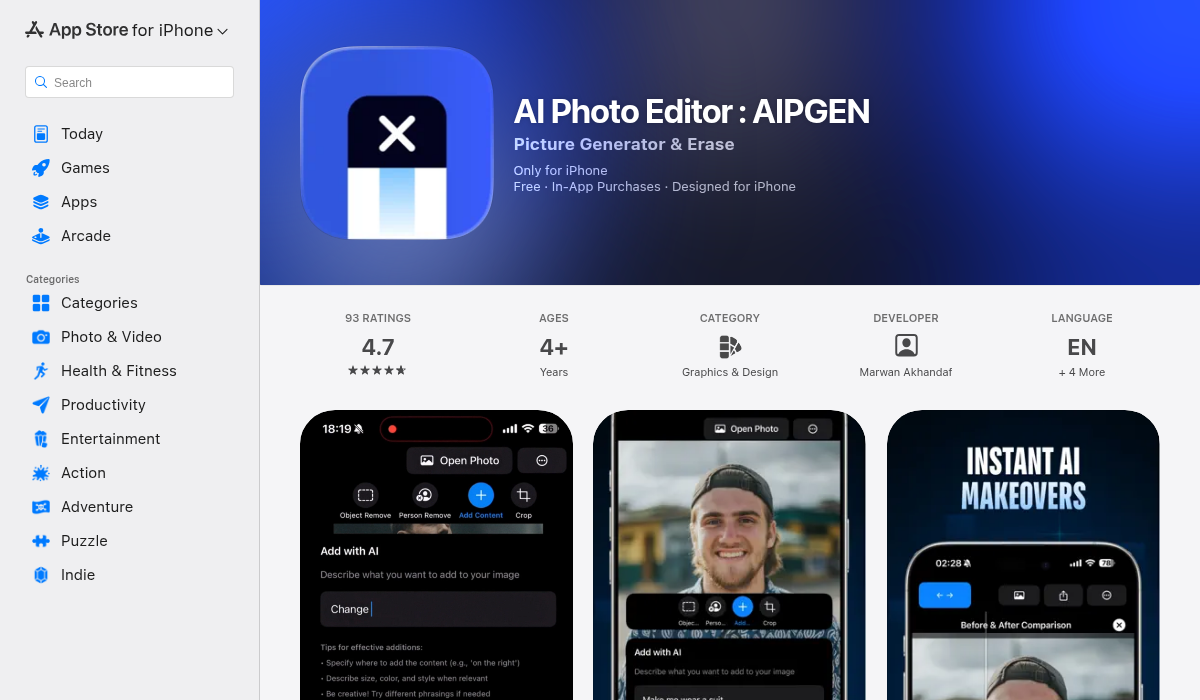
AIPGEN takes a different approach — instead of being a one-trick sharpening tool, it's a complete AI photo editor that handles restoration as part of a broader toolkit. The app's photo restoration feature specifically targets old, damaged, or blurry photos.
- ✅ AI restoration for blurry/old photos
- ✅ 60+ AI editing templates for quick fixes
- ✅ Object and person removal when needed
- ✅ Before/after slider to compare results
- ✅ Works on iOS and Android
- ✅ Free trial edit included
- ❌ Full features require subscription
What makes AIPGEN stand out is the combination of features. You might fix a blurry family photo, then remove an unwanted person from the background, then add a filter — all in one app. The 60+ AI templates also offer quick-apply styles that can mask remaining imperfections while giving photos a professional look.
The before/after slider is particularly useful for restoration work. You can see exactly what changed and adjust if needed before saving.
Pro Tips for Best Results
- Start with the highest resolution available — If you have the original file, use that instead of a compressed social media version
- Try multiple tools — Different AI models excel at different blur types; one app might succeed where another fails
- Don't over-sharpen — Subtle enhancement usually looks more natural than aggressive processing
- Consider the use case — A photo for Instagram doesn't need the same quality as a print
- Manage expectations — AI can't recover detail that doesn't exist; extremely blurred photos may only improve marginally
When AI Can't Help (And What to Do)
Let's be realistic: some photos are beyond saving. If the subject is almost unrecognizable due to blur, AI will either fail or generate details that weren't in the original — essentially making things up.
"For heavier blur, results get artificial fast. Tools like AI sharpeners work best as a starting point, not a final solution."— Reddit user in r/AIAssisted
For these cases, your options are:
- Embrace the blur — Some photos work as artistic, soft-focus images
- Use it as a reference — If you can reshoot, the blurry version at least shows the composition you wanted
- Combine with other edits — A filter or vignette can make softness look intentional
The Bottom Line
AI photo restoration has genuinely transformed what's possible with imperfect images. For mild to moderate blur — the kind you get from slight camera shake or a quick-moving subject — modern tools can produce impressive results that look natural.
For portrait-focused work, Remini remains excellent. For professional desktop use, Topaz is unmatched. For everyday mobile editing where you need restoration plus other AI tools, AIPGEN offers the most complete package.
The best advice? Grab that blurry photo you've been holding onto and try a free enhancement. You might be surprised what AI can salvage from memories you thought were lost.