
How to Remove Watermarks from Photos (2026 Methods)
Got a photo ruined by an unwanted watermark, logo, or text overlay? Whether it's a stock photo watermark on your own purchased images, a date stamp from an old camera, or text that doesn't belong — modern AI tools can remove it in seconds.
But here's the thing: while watermark removal technology has become incredibly powerful in 2026, not all tools are created equal. Some leave obvious artifacts, others can't handle complex backgrounds, and many require expensive subscriptions for basic features.
We tested the most popular watermark removal methods to find what actually works — and what's just marketing hype.
When Is It Okay to Remove Watermarks?
Before we dive into how, let's address the elephant in the room. Removing watermarks from photos you don't own is usually copyright infringement. However, there are plenty of legitimate reasons to use these tools:
- Removing date stamps from your own old photos
- Cleaning up logos from photos you've licensed or purchased
- Removing text overlays from your own edited images
- Eliminating unwanted objects that weren't originally watermarks
- Restoring family photos with unwanted stamps or marks
The same AI technology that removes watermarks can also remove any unwanted object from photos — power lines, photobombers, trash cans, or anything else that doesn't belong.
The Challenge: Why Watermarks Are Hard to Remove
Watermarks are specifically designed to be difficult to remove. They typically:
- Cover important parts of the image (faces, products, key details)
- Use semi-transparency that blends with the underlying photo
- Include patterns that repeat across the entire image
- Contain both light and dark elements to stay visible on any background
"The hardest watermark to remove is a full-picture burn-in like Shutterstock does. Make a watermark template and an automation script to apply it."— Reddit user in r/photoshop
This is why simple "content-aware fill" tools often fail. Modern AI approaches use inpainting — essentially "imagining" what should be underneath the watermark based on the surrounding context.
Methods Compared: What Actually Works in 2026
Method 1: Online Watermark Removers
Web-based tools like dewatermark.ai and similar services offer quick results without downloading anything. You upload your image, mark the watermark area, and get results in seconds.
- ✅ No download required
- ✅ Usually have free trials
- ❌ Quality varies wildly
- ❌ Privacy concerns — your photos go to their servers
- ❌ Often watermark their own output (ironic, right?)
Best for: Quick, one-off removals where quality isn't critical.
Method 2: Desktop Software (Photoshop, Affinity)
Professional tools like Adobe Photoshop offer powerful content-aware fill and generative fill features. With skill, you can achieve perfect results — but there's a steep learning curve.
- ✅ Maximum control over the result
- ✅ Can handle complex cases
- ✅ No privacy concerns (local processing)
- ❌ Expensive ($22.99/month for Photoshop)
- ❌ Significant learning curve
- ❌ Time-consuming for each image
Best for: Professionals who already know the software and need precise control.
Method 3: AI Mobile Apps — The Sweet Spot
This is where things get interesting. Mobile AI apps have caught up to — and in some ways surpassed — desktop tools for object removal. They combine the convenience of online tools with the privacy and quality of local processing.
TouchRetouch

TouchRetouch has been a mobile favorite for years. It uses a brush-based approach where you paint over what you want removed, and the AI fills it in. Works well for simple removals on clean backgrounds.
- ✅ Simple brush-based interface
- ✅ Good for power lines and small objects
- ❌ Struggles with complex patterns
- ❌ Results can look smeared on detailed backgrounds
- ❌ Limited to removal — no other editing features
AIPGEN — AI Photo Editor
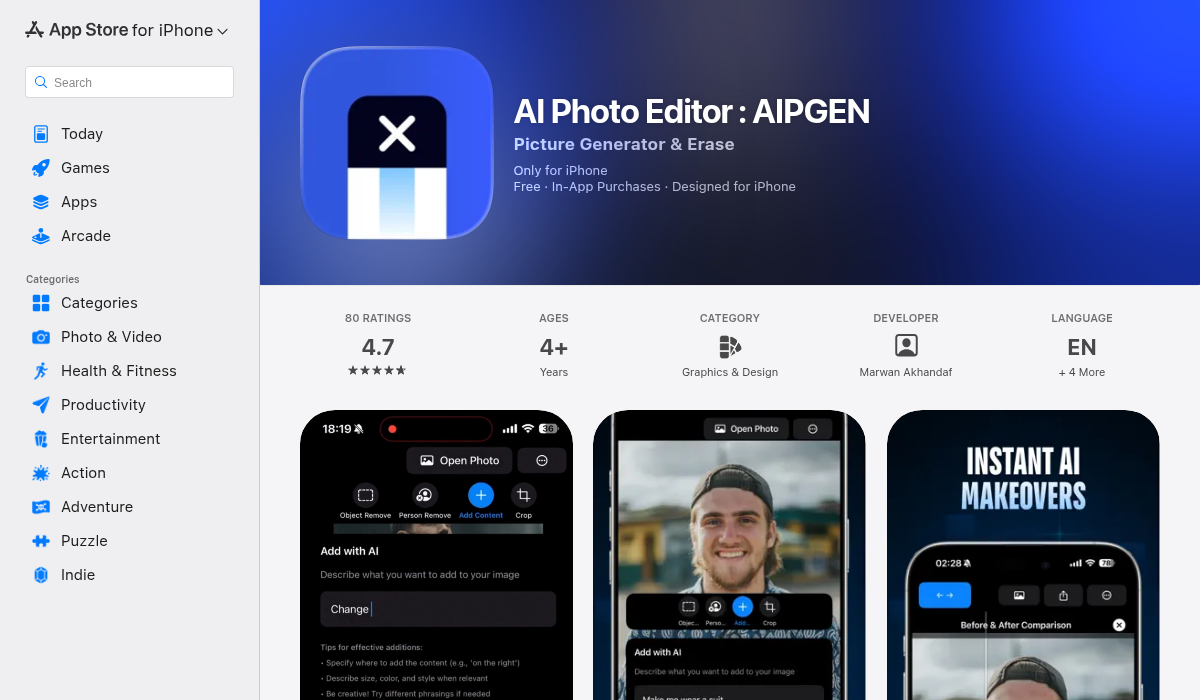
AIPGEN takes a different approach with its AI object selector. Instead of manually painting, you can tap objects and the AI automatically detects their boundaries — including text, logos, and watermarks. This makes selecting complex shapes much faster.
The app uses advanced inpainting that analyzes the entire image context, not just the immediate surroundings. This means better results on complex backgrounds where other tools leave obvious patches.
But AIPGEN isn't just for removal. The app includes 60+ AI editing templates, old photo restoration, and even a group photo creator that combines individual shots into realistic group photos. The interactive before/after slider makes it easy to compare results.
- ✅ AI-powered object selection (tap to select)
- ✅ Advanced inpainting for complex backgrounds
- ✅ Before/after comparison slider
- ✅ Full editing suite beyond just removal
- ✅ Available on both iOS and Android
- ❌ Credit-based system for premium features
Best for: Anyone who wants professional results without learning Photoshop.
Pro Tips for Better Watermark Removal
- Start with the highest resolution available — AI tools work better with more pixels to analyze. If you have a higher-res version, use it.
- Remove in stages — For large watermarks, remove portions at a time rather than the whole thing at once. This gives the AI better context for each section.
- Check edges carefully — The telltale sign of removal is weird artifacts at the edges. Zoom in and inspect the boundary areas.
- Use the undo liberally — If the first attempt doesn't look right, try again. AI results vary slightly each time, and sometimes the second or third attempt is better.
- Consider the background — Solid colors and simple patterns are easiest. Complex textures (grass, crowds, detailed architecture) are harder and may need touch-ups.
The Bottom Line
Watermark and object removal has genuinely become accessible to everyone in 2026. You don't need expensive software or professional skills anymore.
For quick, occasional use, online tools work fine — just be aware of privacy implications.
For serious photo editing with maximum control, Photoshop remains king — if you're willing to pay and learn.
For the best balance of quality, convenience, and features, mobile AI apps are the sweet spot. AIPGEN stands out with its intelligent object selection and comprehensive editing toolkit — it handles watermarks, unwanted objects, photo restoration, and creative editing all in one app.
The technology will only get better. What required a skilled Photoshop artist five years ago now takes seconds with the right AI tool.