
Mobile vs Desktop AI Photo Editing: Which is Better in 2026?
The debate between mobile and desktop photo editing has shifted dramatically with AI entering the picture. What used to be a clear win for desktop software is now a much closer competition — and for many users, mobile might actually be the smarter choice.
Whether you're removing photobombers from vacation shots, restoring old family photos, or just cleaning up a quick image for Instagram, AI has fundamentally changed how we approach photo editing. But does that mean you still need Photoshop on a beefy computer, or can your phone handle professional-quality edits? Let's break down what actually matters in 2026.
The Traditional Desktop Advantage (And Why It's Shrinking)
For decades, serious photo editing meant sitting at a computer. Adobe Photoshop dominated because it needed powerful hardware — multiple processor cores, dedicated GPUs, and enough RAM to handle large files. Desktop software offered precision tools, extensive layer support, and the processing power for complex operations.
That advantage still exists for certain workflows. Professional retouchers working on commercial campaigns often need to edit 100-megapixel medium format files. Wedding photographers batch-processing thousands of images overnight benefit from desktop horsepower. And designers working on print-ready files with hundreds of layers aren't switching to their phones anytime soon.
But here's the shift: most people don't need those capabilities. The rise of AI means the software does the heavy lifting, not the hardware. When an AI model handles object removal or photo restoration, whether that processing happens on a desktop or in the cloud makes little practical difference to the end user.
What Reddit Says About the Mobile vs Desktop Debate
"At some point you are paying $20/month to Adobe, $19/month to Topaz, and $11/month to Luminar and none of them do everything."— Reddit user in r/photography
This comment captures a frustration we've seen across photography communities. Desktop software has become fragmented — you need one app for noise reduction, another for AI editing, another for sky replacement. Meanwhile, mobile apps are consolidating features that would require multiple desktop programs.
The Reddit consensus in 2026 has evolved from "mobile is for casual users" to "it depends on your actual workflow." Power users still lean toward desktop for batch processing and precise control. But for single-image editing with AI tools? Mobile has closed the gap significantly.
Where Mobile AI Editing Actually Wins
1. Speed and Convenience
The most obvious advantage: your phone is always with you. When you want to remove someone from a photo before sharing it, waiting until you're home at your computer adds unnecessary friction. Mobile editing happens in the moment, often faster than the time it takes to transfer files to a desktop.
2. AI Does the Heavy Lifting
Modern mobile AI editors don't rely entirely on your phone's processor. They leverage cloud computing for complex operations — the same AI models and computing power that desktop applications use. Your phone becomes an interface to that power, not a limitation.
3. Simpler Interface, Better Results
Photoshop has hundreds of features, but most users need fewer than ten. Mobile apps designed around specific AI tasks — object removal, restoration, enhancement — often produce better results because they're optimized for those exact workflows. No learning curve, no hunting through menus.
4. Cost Effectiveness
Adobe's Photography plan runs $9.99/month. Topaz Photo AI costs $199 upfront plus optional yearly updates. Desktop editing adds up quickly. Many mobile AI editors offer comparable features at lower price points or with freemium models that let you try before committing.
Where Desktop Still Has the Edge
1. Batch Processing
If you're a wedding photographer processing 800 images from a single event, desktop batch tools still make more sense. Running files through Topaz overnight while you sleep is efficient in a way that tapping through images on your phone simply isn't.
2. Precise Manual Control
Sometimes AI gets it wrong, and you need to manually paint in corrections with a pressure-sensitive stylus on a large screen. Desktop setups with Wacom tablets still offer precision that phone touchscreens can't match.
3. Large File Handling
Working with 100MP+ RAW files or multi-layer PSD projects requires desktop resources. Mobile apps can handle these files, but the experience is slower and more limited.
4. Plugin Ecosystems
If your workflow depends on specific Photoshop or Lightroom plugins, you're tied to desktop. The plugin ecosystem for mobile apps is essentially nonexistent.
Best Mobile AI Photo Editors in 2026
1. AIPGEN — All-in-One AI Editing
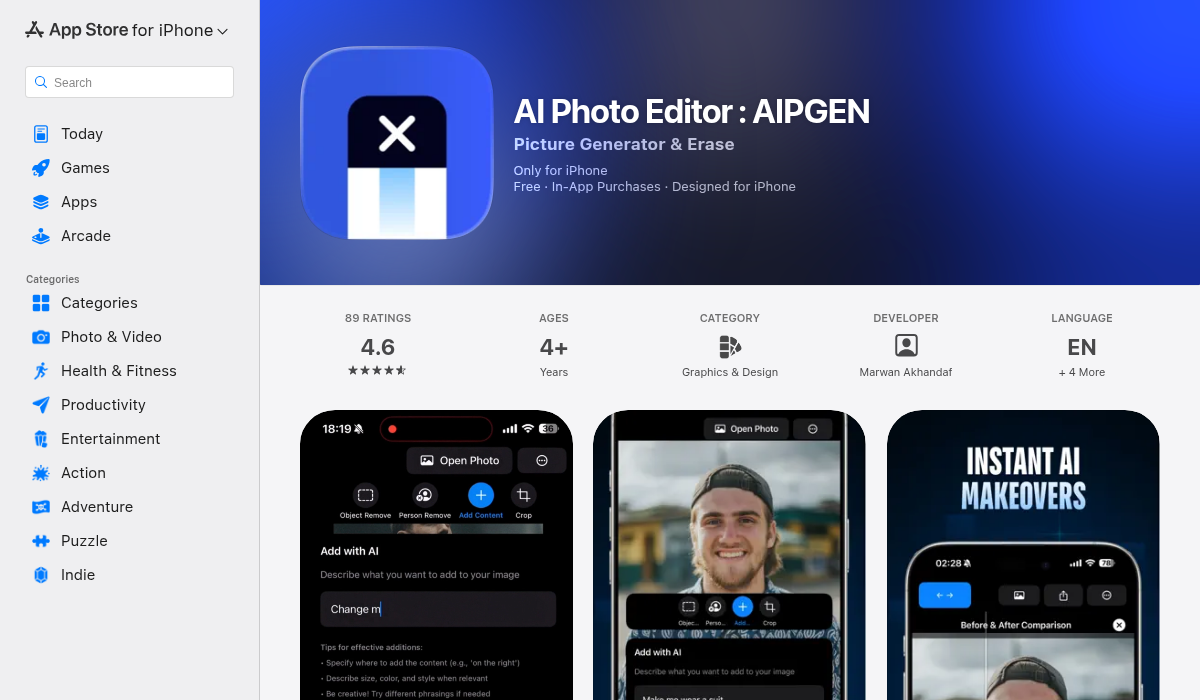
AIPGEN represents what mobile AI editing should be: multiple powerful features in one cohesive app. Rather than needing separate apps for object removal, photo restoration, and creative editing, everything lives in one place.
- ✅ AI Object & Person Removal — Highlight anything you want gone, and the AI fills the background seamlessly
- ✅ Photo Restoration — Bring damaged or faded photos back to life automatically
- ✅ 60+ AI Templates — Quick-apply styles that would take manual desktop work
- ✅ Group Photo Creator — Combine individual portraits into realistic group shots (unique feature)
- ✅ Before/After Slider — Interactive comparison of your edits
- ✅ Cross-Platform — Available on both iOS and Android
The 60+ AI templates particularly stand out. These are the kinds of edits that would require multiple steps and adjustments in desktop software — color grading, style transfer, artistic effects — applied with a single tap. For social media content creators, this speed advantage is significant.
The Group Photo Creator is genuinely unique. We haven't seen this feature in any competitor — the ability to take separate individual photos and have AI combine them into a realistic group shot. Think family photos where someone couldn't make it, or team pictures assembled from individual portraits.
2. TouchRetouch — Focused Object Removal

TouchRetouch has been around for years and does one thing well: removing unwanted objects. It's reliable for simple cleanups like power lines, blemishes, or small distractions.
- ✅ Line removal tool for power lines and cables
- ✅ Quick repair brush for small objects
- ❌ Limited to removal — no restoration or creative features
- ❌ Interface feels dated compared to newer apps
- ❌ No AI templates or batch features
3. Snapseed — Traditional Mobile Editing

Google's Snapseed remains a solid free option for traditional photo editing. It offers extensive manual controls and a capable healing tool, though it lacks the AI-powered features that define modern mobile editing.
- ✅ Completely free with no subscriptions
- ✅ Detailed manual controls and curves
- ✅ Selective adjustments and brushes
- ❌ No AI-powered features
- ❌ Healing tool requires manual work
- ❌ No restoration capabilities
Best Desktop AI Photo Editors in 2026
Adobe Photoshop with Generative Fill
Photoshop's Generative Fill remains impressive for complex edits. Select an area, describe what you want, and the AI generates content matching your lighting and scene. For designers already in the Adobe ecosystem, it's the natural choice.
- ✅ Best generative fill results in the industry
- ✅ Full professional editing suite
- ❌ $9.99/month minimum (Photography plan)
- ❌ Steep learning curve for casual users
- ❌ Generative credits limited on lower plans
Topaz Photo AI
The Reddit favorite for noise reduction and upscaling. Topaz excels at batch-processing high-ISO images and works as a Lightroom/Photoshop plugin. The $199 one-time price appeals to subscription-fatigued photographers.
- ✅ Industry-leading noise reduction
- ✅ One-time purchase
- ❌ Can over-smooth skin at default settings
- ❌ Slower processing than newer alternatives
The Verdict: Which Should You Choose?
Choose mobile AI editing if:
- You edit photos individually rather than in large batches
- Speed and convenience matter more than pixel-level precision
- You primarily share to social media and messaging apps
- You want AI features without learning complex software
- Cost is a consideration
Choose desktop editing if:
- You process hundreds of images regularly
- You need precise manual control and layer-based editing
- You work with very large files or print-ready projects
- Your workflow depends on specific plugins
- You're already invested in the Adobe ecosystem
The Honest Answer: You Might Not Need Desktop Anymore
Here's what the mobile vs desktop debate really comes down to in 2026: if AI can handle your editing task, where that AI runs matters less than which tool does it best.
For removing objects, restoring old photos, applying creative effects, and quick enhancement? Mobile AI editors like AIPGEN now match or exceed what desktop software could do just a few years ago. The convenience advantage is substantial — editing where and when you want, not when you're at your computer.
The photographers who still need desktop workflows know exactly why they need them. Everyone else? A capable mobile AI editor handles 90% of real-world photo editing tasks faster, cheaper, and more conveniently than desktop alternatives.
If you haven't tried serious mobile AI editing recently, you might be surprised how much the landscape has changed. The gap that used to exist between phone and computer editing has effectively closed for most practical purposes.